











Swami Sivasubramanian, Vice President of Agentic AI at AWS, highlights that Amazon Quick Suite brings the power of AI to the workplace—combining intelligence, automation, and enterprise-grade security to transform productivity, decision-making, and collaboration across business data and workflows.
We’ve all experienced how AI can transform our personal lives, but this same experience hasn’t been unlocked at work—yet. Consumer AI solutions aren’t connected to all your business data. They don’t have access to the tools you need to get things done at work. And many organizations won’t even let you use consumer offerings, because they lack critical security and privacy features.
That’s why we invented Amazon Quick Suite – it’s the AI experience people love with the security and privacy enterprises trust. Quick is your AI teammate that collaborates with you to get work done. With Quick, you can ask questions and get detailed answers, conduct deep dive research, analyze and visualize data, and create automations for workflows to save time and let you focus on the big picture. And thanks to the enterprise-grade security and privacy standards, Quick can work across all your information, so you finally get the fully featured gen AI experience you want at work, while knowing your queries are never used to train a model.
So how does Quick Suite work?
Quick Index makes it simple for you to connect to the sources and applications that matter. With over 50 built-in connectors for applications like Adobe Analytics, SharePoint, Snowflake, Google Drive, OneDrive, Outlook, ServiceNow, Databricks, Amazon Redshift, and Amazon S3, Quick brings together all your data securely to ensure you have full context for every decision. You can then add additional files, dashboards, and other information to dedicated Spaces for you and your team to collaborate.
Ask questions and build agents
Once you’ve connected your data to Quick, you can start interacting with the chat assistant. You can ask Quick to write and send communications for you, or if you want Quick to write in your style or for a particular task (like writing a case study), you can use natural language or point Quick at existing guides or documentation to create a custom agent able to communicate in your intended style.
Analyze and visualize data with Quick Sight
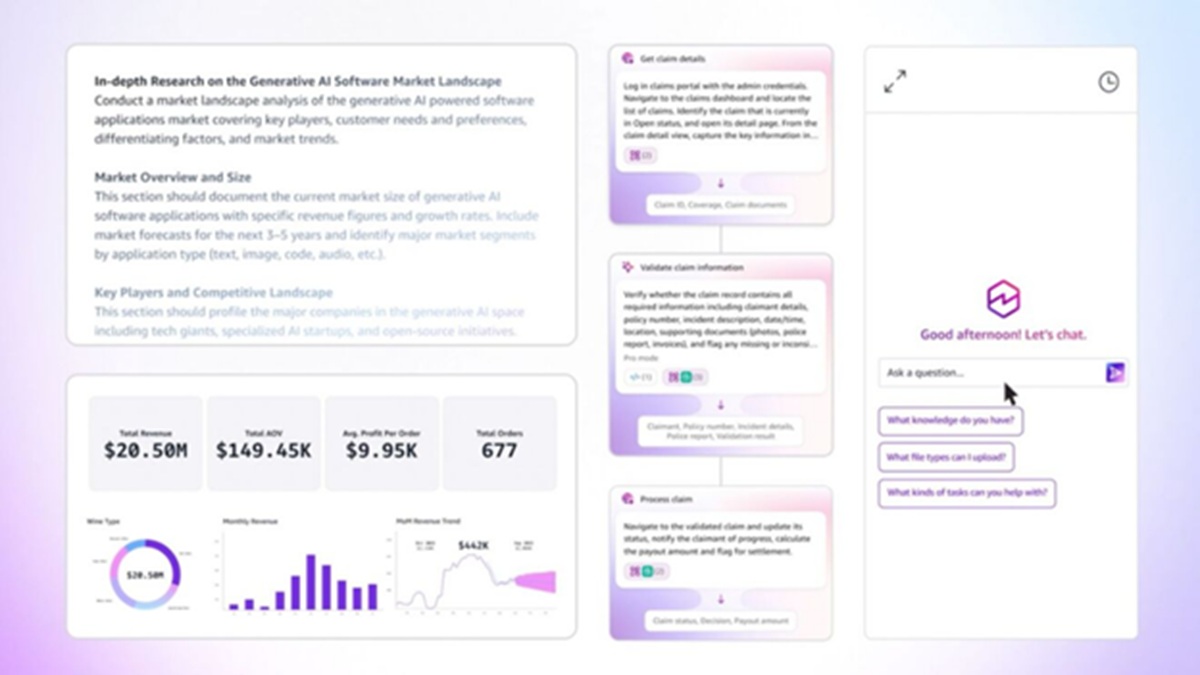
Quick Sight makes business intelligence accessible to everyone with a new agentic experience, helping you gain insights to make better decisions. Unlike traditional business intelligence tools that work only with databases and data warehouses, Quick Sight’s agentic experience analyzes all forms of data across all your systems and apps, including your documents.
For example, a marketer can now easily look at a dashboard of their campaign data with metrics and customer feedback and ask questions in natural language about how the campaign is performing. They get a crisp analysis of the data in seconds without hours of manual statistical analysis, compiling sentiment from feedback, and summarizing the findings into a narrative.
 Dive deep into complex questions with Quick Research
Quick Research is the most accurate and reliable research agent on the market, ready to answer your most in-depth questions. It uses sophisticated analysis capabilities and extended processing to dive into your company’s data, and the public internet, including real-time information from 200+ outlets like The Associated Press, The New York Times, Washington Post, and Forbes,turning weeks-long research projects into quick-turn results, all with fully cited sources you can trust.
We tested Quick Research on DeepResearch Bench, a comprehensive benchmark for evaluating research agents, using a collective jury, where it provided the most accurate and reliable research across a range of tasks.
Streamline repetitive tasks with Quick Flows
Quick Flows helps you use simple prompts to create automated workflows that handle repetitive tasks, like compiling weekly reports or preparing for a recurring meeting, reducing errors and freeing you and your team from busy work.
 Handle complex multi-system workflows with Quick Automate
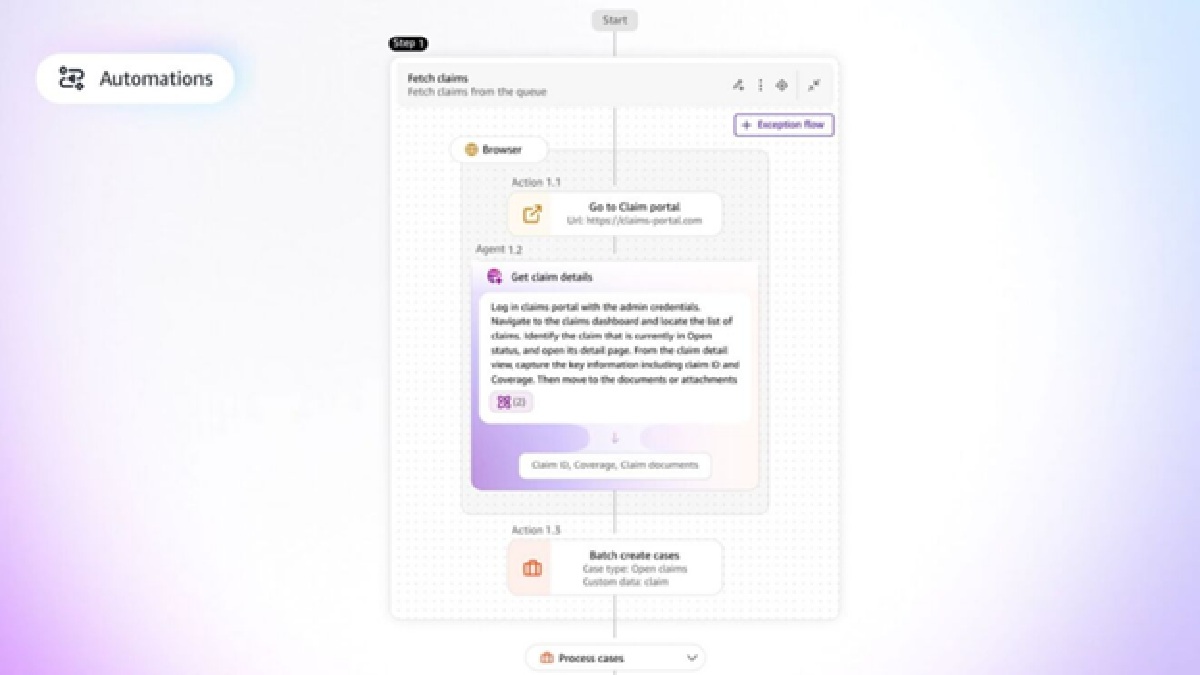
When these processes get complex and require hundreds of steps to be securely executed across multiple enterprise systems, like insurance claims processing or onboarding a new employee, teams wish that these tasks could be streamlined, but they lack the sophisticated automation tools and expertise to do it. With natural language prompts or by simply using existing documentation for their standard operating procedure, Quick Automate coordinates even the most complex business workflows across multiple applications, systems, or departments.
Quick works wherever you are. With an intuitive web application, extensions in popular browsers like Chrome and Firefox, and extensions in Microsoft Outlook, Teams, and Word, Quick helps you find answers and act immediately in your flow of work.
Beyond productivity: A whole new way of working
What strikes me about these examples isn’t just the time saved—it’s how Quick is fundamentally changing our relationship with work. It’s removing the busy work that used to consume valuable time and energy and gives us the time back to focus on what matters. It brings together all the data, metrics, and institutional knowledge you need to make decisions, and helps you act on these decisions to drive outcomes.
We’ve been blown away by all the creative ways people have used Quick so far, and we’re excited to see how others will use it in the future. There are so many possibilities to dig into with these tools, and our team is hard at work finding ways to make them even more useful for customers in the future.